
Ammo Inventory App
You track ammo for one reason — so you’re not guessing when it counts.
The myArmsCache Ammo section keeps an exact count of rounds on hand for every ammo type: each purchase adds to the count, each range session subtracts from it, so the number is real, not an estimate you adjust by hand.
Set the target you want on hand and you’ll know when to buy before you run low — and what each round actually costs you.
Keep a complete record of your ammo
For every ammo record you add, myArmsCache tracks the rounds you have purchased, fired, and still have available.
These counts update whenever you add a purchase or log a Range Report.
- Ammo Details: Record the name, caliber, manufacturer, bullet type, bullet weight, item number, primer type, casing type, muzzle velocity, muzzle energy, tags, and notes. Add a photo.
- Purchase History: Log each purchase with the seller, price, number of rounds, purchase date, and location. You can also add a receipt photo. The ammunition record shows total rounds purchased, total spent, and average cost per round.
- Range Use and Malfunctions: When you log a Range Report, the rounds fired are automatically deducted from your available ammunition. The ammunition record shows total rounds fired, total malfunctions, the last-used date, and each Range Report in which that ammunition was used.
- Rounds Target and Stock Status: Set a rounds target that applies to every individual ammunition record. Each record displays its rounds available and current status. Ammo can also be added to the Shopping List directly from its record.
Ammo Dashboard
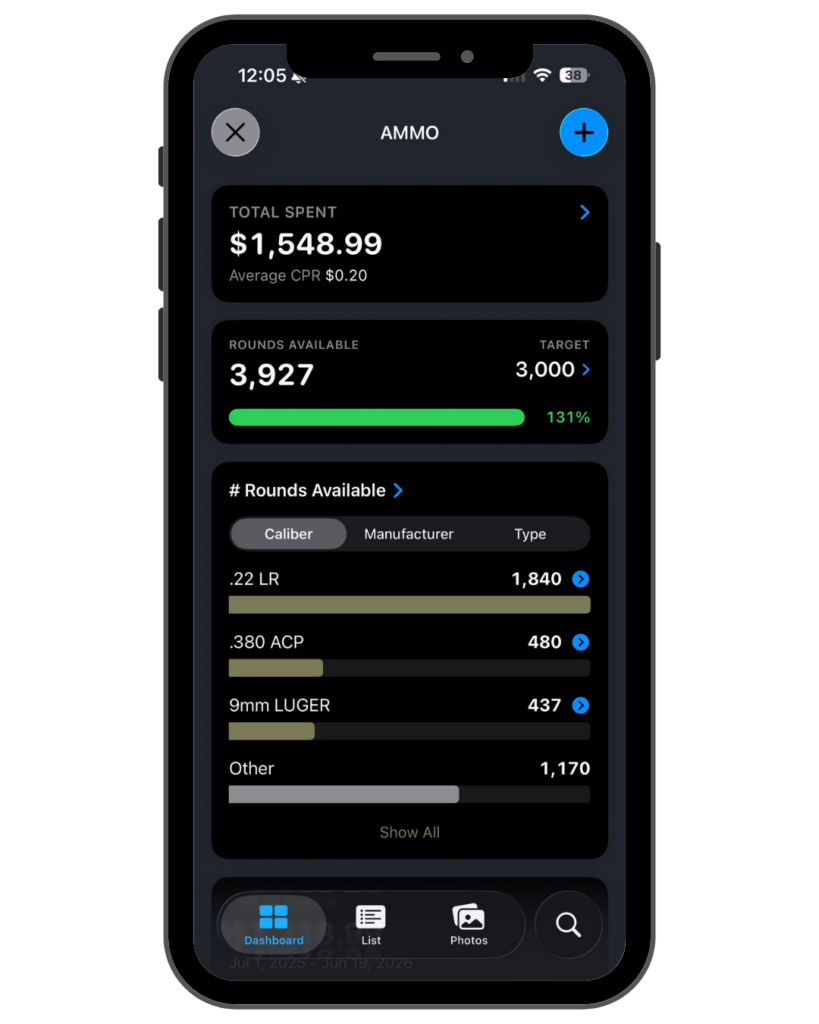
The Ammo Dashboard shows the state of your ammo supply at a glance — rounds available against your target, rounds purchased and shot, what you’ve spent, and your average cost per round.
- Spending Totals: View total amount spent on ammo and your average cost per round across all purchases, including the total rounds purchased and rounds shot.
- Rounds Available Target: When you set the number of rounds you want on hand, and a gauge compares your current stock against it — green when stocked, orange when running down, red when low.
- Inventory Breakdowns: See how many rounds available, rounds shot, rounds purchased, and total spent broken down by caliber, manufacturer, and bullet type.
- 12-Month Spending Chart: View your ammo purchases over the previous 12 months.
- Ammo Reports: Access to the Ammo Purchase Report, Last Range Activity report, and Most Used report.
- Lists: Links to your Shopping List and Archived Ammo.
Ammo List
The myArmsCache Ammo List shows every ammo type in your inventory with rounds remaining on each row.
- Sorting: The list can be sorted by caliber, manufacturer, bullet type, or favorites.
- Rounds Remaining: Each ammo shows its rounds remaining, updated automatically as you log range sessions. The count turns red when stock falls below your low-stock level.
- Row Details: Each row shows the ammo’s photo, manufacturer, bullet type, and bullet weight.
- Cost Per Round: Detailed rows add cost per round, tags, and the date last used at the range.
- Row Styles: Rows can be displayed as compact, detailed, or extended. Extended rows add purchase history — dates, times purchased, total rounds, and total spent.
- Group Totals: Each group header shows the total rounds remaining and item count for that caliber, manufacturer, or bullet type.
- Search: Ammo can be searched by caliber, name, manufacturer, bullet type, store, tags, or notes, and results show which field matched.
Ammo Details
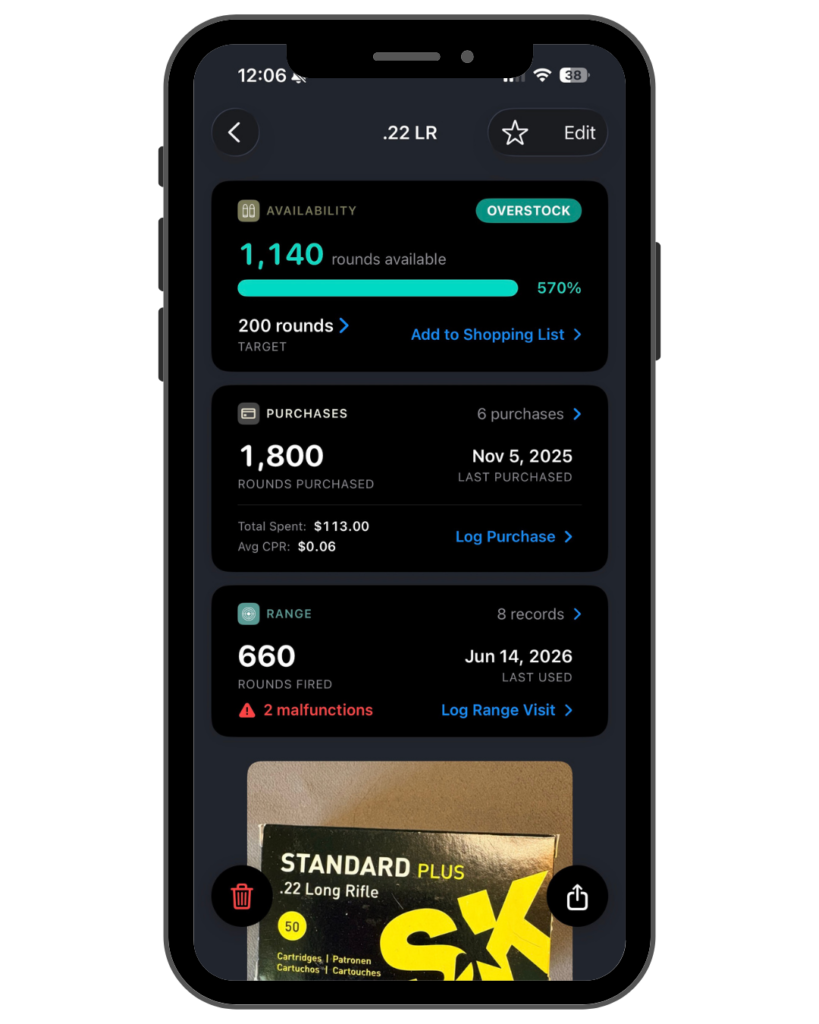
The myArmsCache Ammo Details screen displays the complete record for a single ammo type.
- Rounds Available: The screen shows rounds on hand with a stock status measured against your target — out of stock, low stock, below target, stocked, or overstock.
- Purchases: Every purchase is logged with the seller, price, rounds, date, location, and a receipt photo. Totals show rounds purchased, amount spent, and average cost per round.
- Range Activity: Rounds fired, last used date, malfunction count, and the number of range records are displayed.
- Specifications: The record includes caliber, manufacturer, bullet type, bullet weight, primer, casing, muzzle velocity, and muzzle energy.
- Photos: Each ammo holds a photo, and each purchase can hold its own receipt photo.
- Shopping List: Ammo can be added to your shopping list directly from the details screen.
- Actions: An ammo record can be saved as a PDF, duplicated, or archived while keeping its full purchase and range history.
Try myArmsCache free

Available for the iPhone, iPad, and Mac