
Firearm Inventory App for Your Gun Collection
Keep your firearm records organized and easy to find. myArmsCache brings together each firearm’s identifying details, photos, purchase information, storage location, and current value.
Your records also follow how you use and maintain your collection. Log a Range Report to update round counts and malfunctions, and keep cleaning and service history with the firearm.
Available for iPhone, iPad, and Mac.
Firearms Section
The myArmsCache Firearms section gives you a way to have a complete ownership record for every gun in your collection — kept current every time you log a Range Report or a Maintenance record.
- Firearm Details: Record the manufacturer, model, serial number, caliber, action, firearm type, finish, color, capacity, barrel details, condition, manufacture date, storage location, tags, and notes. Add a main photo and multiple additional photos.
- Purchase and Sale Information: Record when and where you bought the firearm, who you bought it from, what you paid, and its current value. If you sell it, the sale date, buyer, and price remain with the firearm’s record.
- Cleaning Interval: Set a cleaning interval based on rounds fired. When a firearm reaches its interval, it is automatically added to the Maintenance Queue.
- Assigned Items: Assign the magazines and accessories used with the firearm and keep a record of the parts installed on it.
- Range Activity: See the firearm’s total rounds fired, last-fired date, and every Range Report connected to it. When you log a Range Report, the app updates the round and malfunction counts automatically.
- Maintenance and Repair History: Keep a complete history of cleanings, inspections, repairs, and other service, including what was done, when it was completed, and what it cost.
Firearms Dashboard
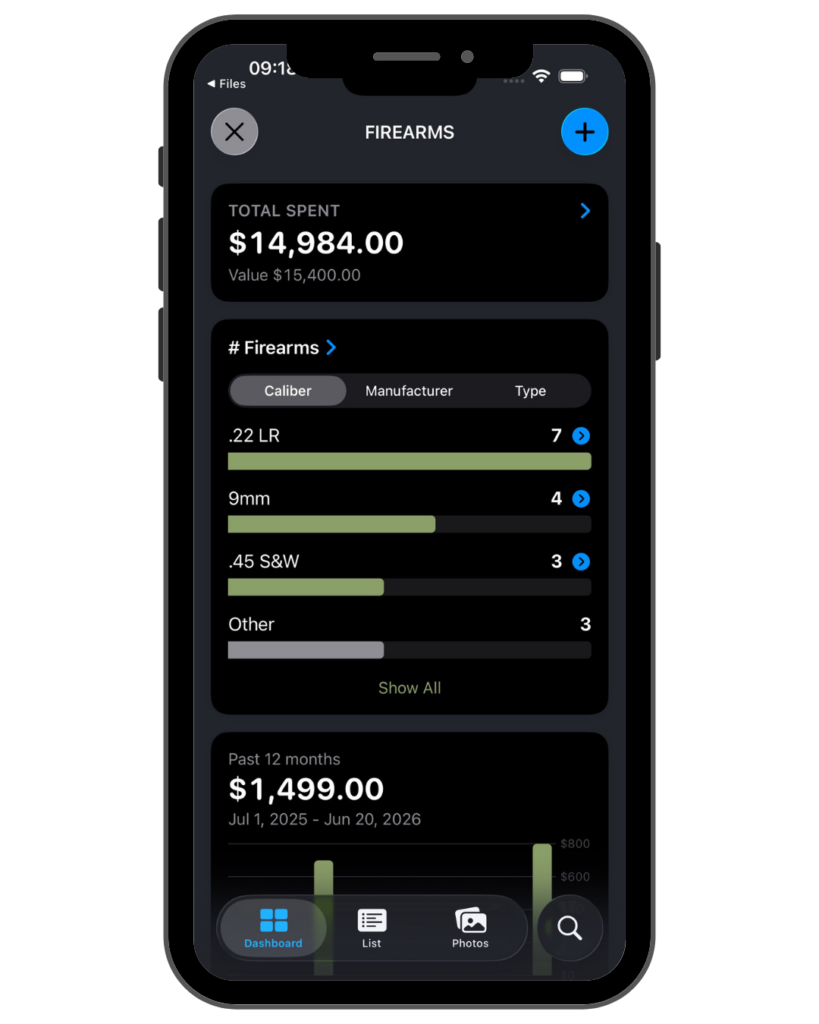
The dashboard shows the state of your entire collection at a glance — how many firearms you own, what you’ve spent, what it’s worth, and which firearms have been to the range recently.
- Inventory Totals: View the number of firearms in your current inventory, total amount spent, and current collection value.
- Current and Sold Firearms: See stats for current firearms from sold firearms along with purchase and sale totals.
- Inventory Breakdowns: Includes firearm counts and spending broken down by caliber, manufacturer, and firearm type. Click to view details.
- 12-Month Spending: View a chart with your firearm purchases over the previous 12 months.
- Firearm Reports: Access the Firearm Purchase Report, Recently Fired report, and Most Used report.
- Firearm Lists: View your Firearm Shopping List and Sold Firearms list.
Firearms List
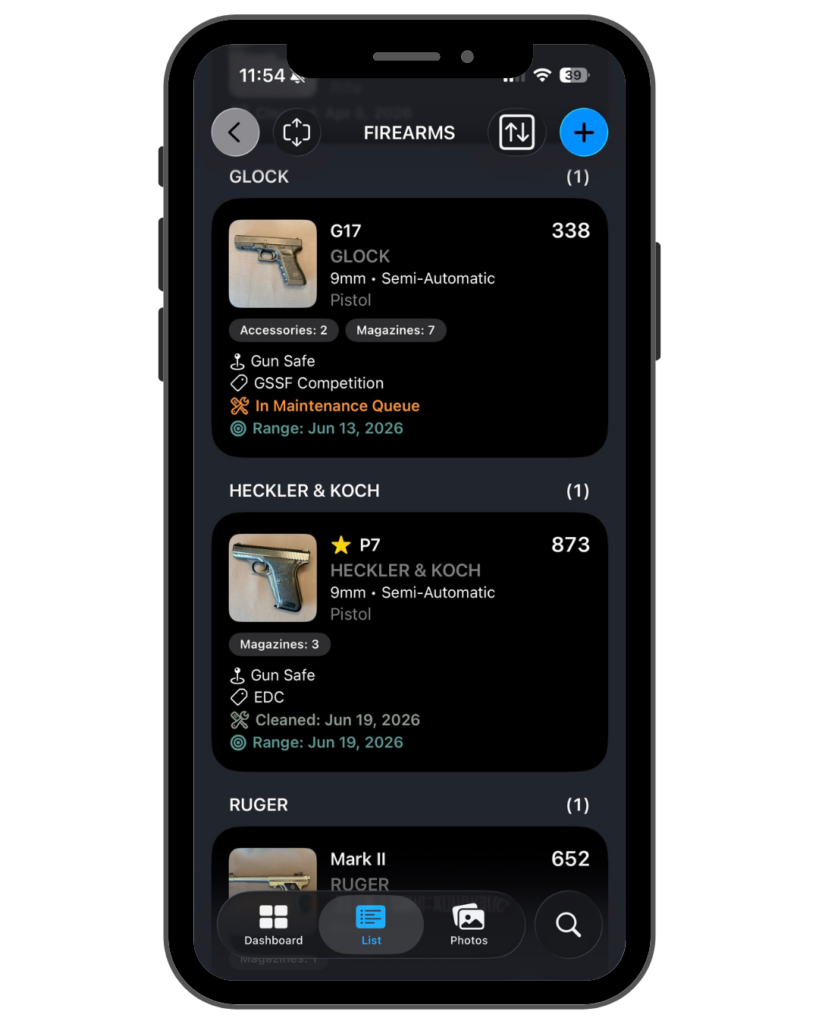
The Firearms List shows every firearm in your inventory with its key details on each row.
- Sorting: The list can be sorted by caliber, manufacturer, model, firearm type, or favorites.
- Round Counts: Each firearm displays its total rounds fired, updated automatically from your range records.
- Row Details: Each row shows the firearm’s photo, manufacturer, caliber, action, and firearm type.
- Assigned Items: Each row shows the number of magazines, accessories, and parts assigned to that firearm.
- Maintenance Status: Firearms in the maintenance queue or out for service are flagged on the row, along with the most recent maintenance date.
- Row Styles: Rows can be displayed as compact, detailed, or extended. Extended rows add the purchase date, price paid, store, and condition.
- Search: Firearms can be searched by model, name, manufacturer, caliber, serial number, condition, location, store, tags, or notes.
Firearm Details
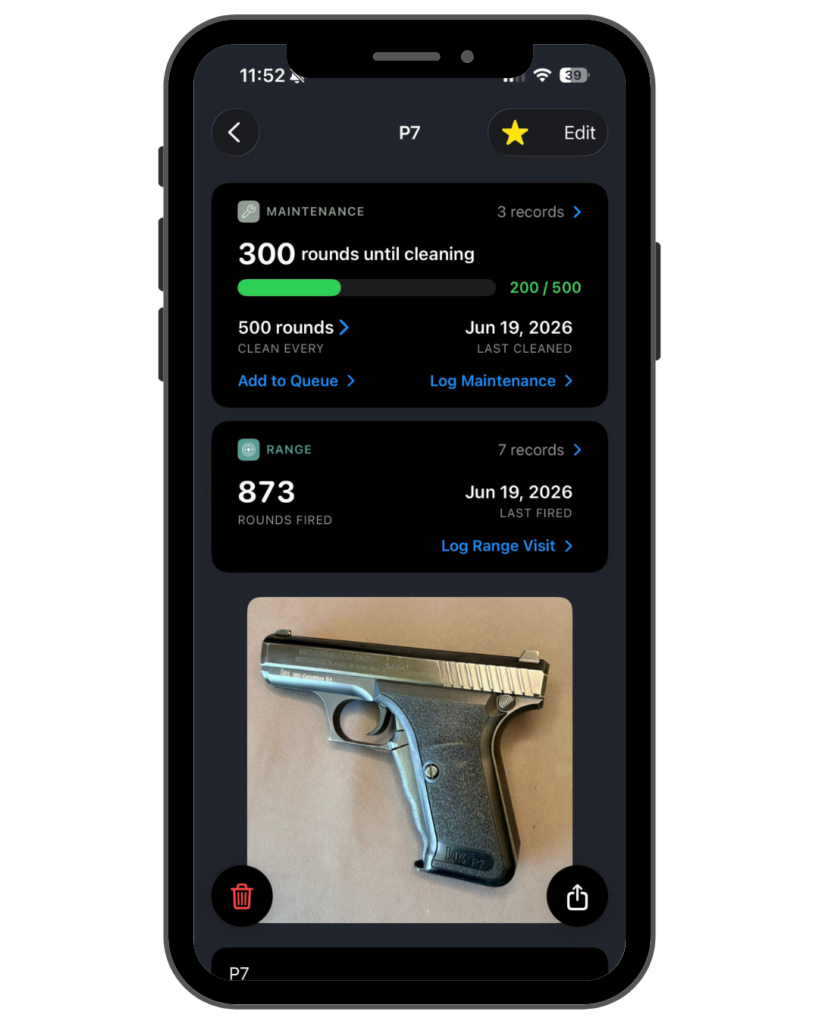
- Cleaning Status: The details screen shows rounds remaining until cleaning, with a gauge that turns red when cleaning is due, and the date last cleaned.
- Range Activity: Total rounds fired, last fired date, malfunction count, and the number of range records are displayed.
- Specifications: The record includes model, model number, manufacturer, caliber, action, firearm type, finish, color, capacity, weight, barrel, serial number, and manufacture date.
- Condition and Value: Each firearm records its condition and appraised value.
- Assigned Items: Magazines, accessories, and parts assigned to the firearm are listed with their combined value.
- Purchase Details: The record includes the seller, item number, price paid, and purchase date.
- Photos: Each firearm holds a primary photo and additional photos.
- Actions: A firearm’s complete record can be saved as a PDF, duplicated, or marked as sold with its sale date, price, buyer, and dealer.
👉🏻 Explore myArmsCache to see how the complete app works.
myArmsCache is available for iPhone, iPad, and Mac, and all details you enter are stored on your device.
Try it for free

Available for the iPhone, iPad, and Mac